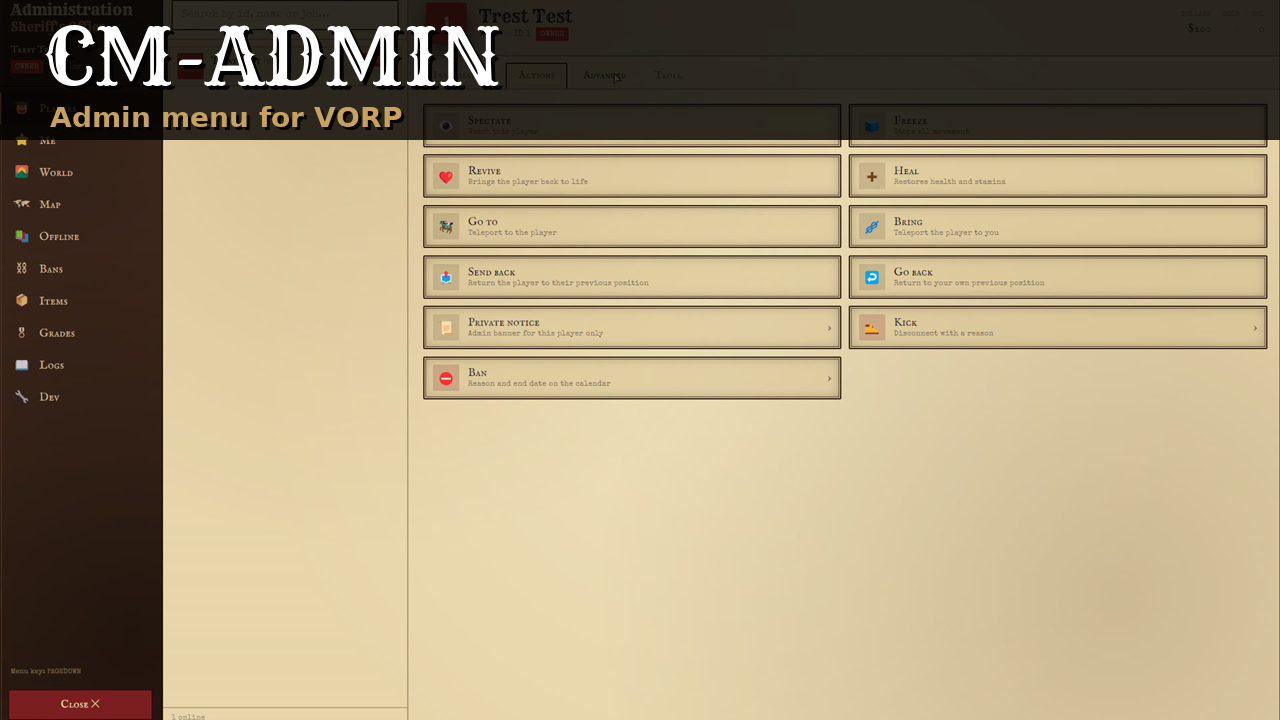






REDM ADMIN PANEL
An admin menu for RedM servers running VORP, in English and French. Staff grades have a weight from 0 to 100 and a permission matrix: a staff member only acts on players and grades below their own weight, and every rule is checked on the server. Keys, grades, ban rules, limits and each part of the menu are set in open config files.
Requires vorp_core, ox_lib and oxmysql. Uses vorp_inventory for items and weapons, vorp_metabolism for hunger and thirst and weathersync for time and weather when they run. The SQL tables are created on the first start.
WHAT IS IN THE MENU
- Players: list with grade, job and ping, a player sheet, spectate, freeze, revive, heal, go to, bring, send back, private notice, kick, ban, set job, give money, items and weapons with ammo, inventory view, hunger and thirst, respawn.
- Troll actions: kill, invisible, lightning, fire, ragdoll, sky, stamina, drunk. They can be turned off.
- Me: god mode, noclip as a free camera, invisibility, infinite ammo, golden cores, temporary horse and wagon, delete vehicles around.
- Teleports: waypoint, typed coordinates, saved locations, previous position.
- World: announcement to everyone, time and weather.
- Offline: search any account by name, character or identifier, see its characters, money, grade history and bans, ban it or change its grade.
- Bans: list with filters and search, lift with a reason. A ban is never deleted.
- Items: catalog with search and images, give to yourself or a player, item editor. A Weapons sub tab gives weapons with ammo.
- Map: online players, sheet, go to and spectate from a marker, teleport on click.
- Grades: create and edit grades, set a player's grade, permission matrix.
- Logs: every action with a consequence, with filters. Also sent to a Discord webhook.
- Dev: copy coordinates, entity inspector, names above players, animation and scenario tester, ped model, spawn a ped, delete an entity.
WHAT YOU CAN SET
Grades. Six grades are created (Player 0 to Owner 100) and you add your own between them. Default permissions per grade, VORP group to grade fallback, ACE permissions that give a grade, optional sync of the VORP group. Only the weight 100 grade edits the matrix. Nobody changes their own grade in game: the server console can always set a grade.
Bans. Every identifier of the player is banned (steam, license, discord, xbl, live, fivem, optionally the IP). The refusal card at connection shows the reason, a reference, the end date and a countdown, with an optional appeal link and image. A banned player back on another account sharing an identifier is refused and the ban learns the new identifiers. Ban cap per grade, quick durations, reference prefix, date format.
Limits and tools. Money, item and ammo limits, message length, noclip speeds and keys, spectate camera, spawn models, teleport locations and weathers, rate limits.
Features. Troll actions, item editor, Discord logs, map and dev tab can each be turned off. Keys and commands are only registered for players with a permission.
Other scripts. Server exports to check a permission or a grade, add your own permissions to the matrix, ban, unban and list bans.
GOOD TO KNOW BEFORE YOU INSTALL
No map tile is shipped and no tile server is set: the RDR2 map image belongs to Rockstar Games. The map tab works without it and shows the players on a blank background. To see the map image, host a tile set you have the right to use and set its URL in the config.
The menu opens on Page Down, like vorp_admin. Stop vorp_admin or change the key. The two have no command in common.
The item editor writes in the VORP items table. vorp_inventory has no reload export, so a created or edited item takes effect on its next restart. Items are never deleted.
Tested on VORP only. The Cfx asset escrow only encrypts Lua: the config, the locales and the interface are shipped readable.
INSTALLATION
- Copy the folder into your resources.
- Add
ensure cm-adminafter vorp_core, oxmysql and ox_lib. - Start the server once, then give yourself the owner grade from the console:
cmadmin grade <id> owner. - Press Page Down in game, or type
/admin.
DOCUMENTATION AND SUPPORT
Full documentation: docs.camsurmotion.fr
Questions, bug reports and feature requests: Discord